
Auto-Refresh STOCKS in Excel | Pull Live Stock Data in Excel | New Feature


The STOCKS data type in Microsoft Excel required manual refresh until now. A new feature released for Microsoft Excel on Desktop for Windows, Mac as well as Excel on the Web, fixes that problem, by allowing you pull almost live stock data into Excel.
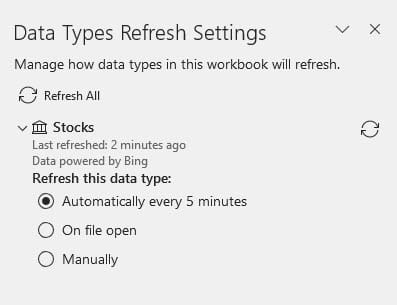
**Stock data type Refresh every 5 minutes**
In this video, I show you how to add various STOCKS to your spreadsheet, how to configure which columns you can see (such as price, last trade time, etc.) and also demonstrate how to enable this new feature, to Refresh Stocks quotes every 5 minutes or when you open the worksheet again.
YouTube Video
Auto-Refresh STOCKS in Excel | Pull Live Stock Data in Excel | New Feature
Chapters
- 00:00 Introduction - 00:43 Add Stocks in Excel Desktop - 01:30 Customize columns - 02:07 Create table from data - 03:17 Refresh options - 03:51 Add Stocks in Excel Web - 04:29 Closing remarks
Stock data type fields
- 52 week high - 52 week low - Beta - Change - Change (%) - Currency - Description - Employees - Exchange - Exchange abbreviation - Headquarters - High - Industry - Instrument type - Last trade time - Low - Market cap Name - Official name - Open - P/E - Previous close Price - Shares outstanding - Ticker symbol Volume - Volume average - Year incorporated



