
8000 royalty-free images are available in Office 365 - April 2020 update

Share
8000 royalty-free images are available in Office 365 - April 2020 update

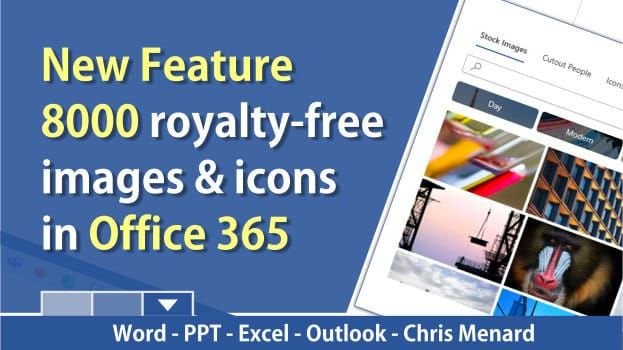
Microsoft brings 8000 royalty-free images and icons to Office 365. These images work in Word, Excel, PowerPoint, and Outlook. Right now, these are only available to Office 365 Fast Insiders.

8000 Stock  Images for Office 365 by Chris Menard

Steps to use the images and icons

1. Click the Insert Tab 2. Click Picture 3. Select Stock Images... 4. Pick an image or icon and select Insert.
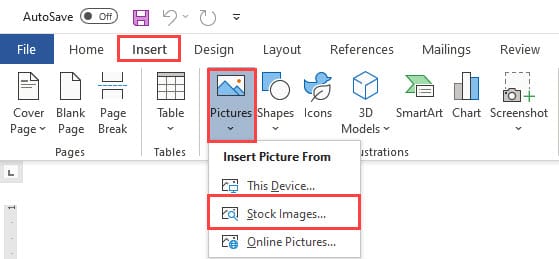
Insert - Picture - Stock Images MS Office 365

Four categories at the top:

1. Stock Images 2. Cutout People 3. Icons 4. Stickers

8000 royalty-free images are available in Office 365 by Chris Menard - YouTube

Microsoft's blog post about the royalty-free images

Microsoft's blog post about the royalty-free images

Read more

Copilot Skills in PowerPoint - Live Stream on October 20, 2026

Copilot Skills in PowerPoint - Live Stream on October 20, 2026

𝗠𝗼𝘀𝘁 𝗣𝗼𝘄𝗲𝗿𝗣𝗼𝗶𝗻𝘁 𝘂𝘀𝗲𝗿𝘀 𝗸𝗻𝗼𝘄 𝗖𝗼𝗽𝗶𝗹𝗼𝘁 𝗰𝗮𝗻 𝗰𝗿𝗲𝗮𝘁𝗲 𝘀𝗹𝗶𝗱𝗲𝘀. 𝗙𝗮𝗿 𝗳𝗲𝘄𝗲𝗿 𝗸𝗻𝗼𝘄 𝗮𝗯𝗼𝘂𝘁 𝘁𝗵𝗲 𝟴 𝗯𝘂𝗶𝗹𝘁-𝗶𝗻 𝗖𝗼𝗽𝗶𝗹𝗼𝘁 𝗦𝗸𝗶𝗹𝗹𝘀 𝘁𝗵𝗮𝘁 𝗰𝗮𝗻 𝗰𝗼𝗺𝗽𝗹𝗲𝘁𝗲𝗹𝘆 𝗰𝗵𝗮𝗻𝗴𝗲 𝗵𝗼𝘄 𝘆𝗼𝘂 𝗯𝘂𝗶𝗹𝗱, 𝗶𝗺𝗽𝗿𝗼𝘃𝗲, 𝗮𝗻𝗱 𝗽𝗿𝗲𝘀𝗲𝗻𝘁 𝗮 𝗱𝗲𝗰𝗸. Join me live on October 20, 2026, at Noon Eastern as I demonstrate each Copilot Skill and show practical ways to use them in your presentations. PDF of the 8 Copilot Skills in Pow

By Chris Menard


