
New in Excel: You Can Now Name Your Table When You Create It


Microsoft is rolling out a small but genuinely useful update to Excel: when you create a new Table, you can now name it right in the Create Table dialog box — instead of accepting the default "Table1" and renaming it later (or, more likely, never renaming it at all).
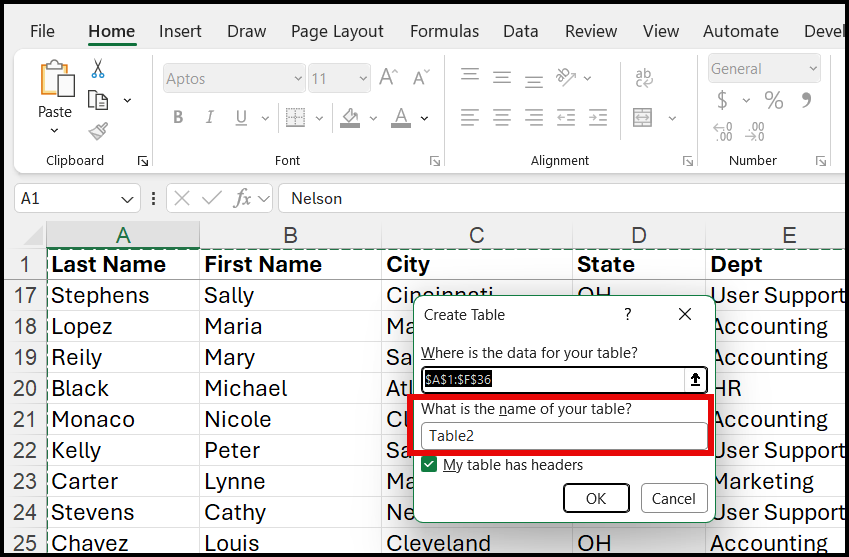
This feature is currently rolling out on the Beta Channel as of August 30, 2026.
It's a tiny workflow change, but it's a good excuse to talk about something many Excel users skip entirely: naming your tables in the first place.
Reasons to Rename Tables
If you're using Tables in Excel — and you should be — naming them matters more than most people think. Here's why.
1. Formulas become readable
Compare these two formulas:
=SUM(Table1[Column3])
=SUM(Sales_2025[Revenue])
The first tells you nothing. The second tells you exactly what you're summing and where it came from. Multiply that across a workbook with a dozen formulas, and named tables turn your formulas into self-documenting code.
2. Copilot works better
When you prompt Copilot in Excel, a meaningful table name gives it real context to work with. "Update the Vendor_Purchases table" is a much clearer instruction than "update Table4" — and the difference shows up in how accurately Copilot understands what you're asking for.
3. Navigation is faster
The Name Box in the top-left corner of Excel becomes a jump-to menu for your entire workbook once your tables have real names. Click the dropdown, pick "Vendor_Purchases," and you're there instantly — no scrolling through sheets to find it.
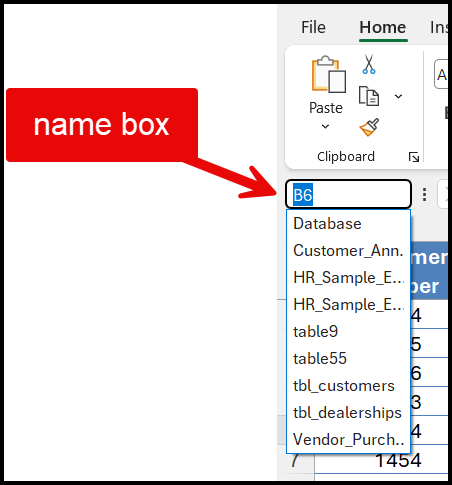
4. Multiple tables stop being confusing
One workbook, five tables, all named Table1 through Table5? Good luck remembering which is which three months from now — or explaining it to a colleague who opens the file for the first time.
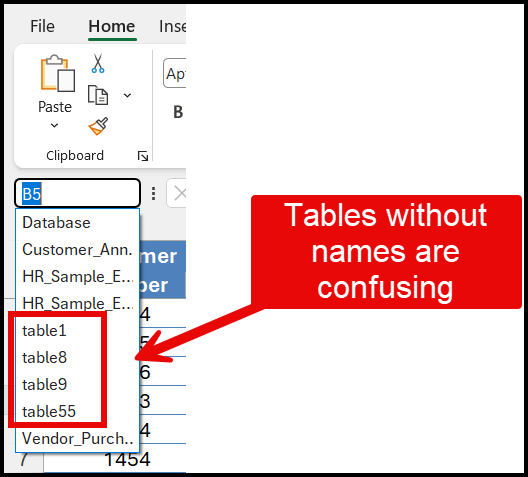
5. Power Query and Power Pivot depend on it
Once you start pulling tables into Power Query or building a data model, "Table1" and "Table2" become a genuine nightmare to trace. Clear table names are the difference between a data model you can maintain and one you can't.
6. It documents your work for free
A well-named table is self-explanatory to the next person who opens the file — including future you, six months from now, trying to remember what you were doing.
Quick Tips: How to Rename a Table Today
Tip1: Create a Table: CTRL + T
Tip2: You don't have to wait for the new feature to start naming your tables properly. Right now, in any version of Excel:
- Click anywhere inside your table
- Go to the Table Design tab (or Table tab, depending on your version)
- Find the Table Name box on the far left
- Type a new name and hit Enter
Takes five seconds, and it saves you hours later.
The Bottom Line
The new "name it at creation" feature removes the friction that causes most people to skip this step entirely. But whether you're using the new dialog or renaming an existing table, the underlying habit is the same: give your tables real names. Your formulas, your future self, and anyone else who opens your workbook will thank you.
Do you name your tables, or are you still on Table1, Table2, Table3? Let me know in the comments.
Chris Menard Training chrismenardtraining.com | LinkedIn



