
New Feature in Microsoft Word for the Web: Edit Tables with Ease


Microsoft Word for the web has introduced some fantastic new features for editing tables. These enhancements are perfect for anyone who frequently uses tables in their documents. Let's dive into these new capabilities and see how they can improve your workflow.
Reordering Columns
One of the most exciting new features is the ability to easily reorder columns in your tables. This feature allows you to customize your table layout quickly.
To reorder a column, simply hover over the column header until you see a blue icon. Click and drag the column to your desired position. A blue line will indicate where the column will be placed when you release the mouse button.
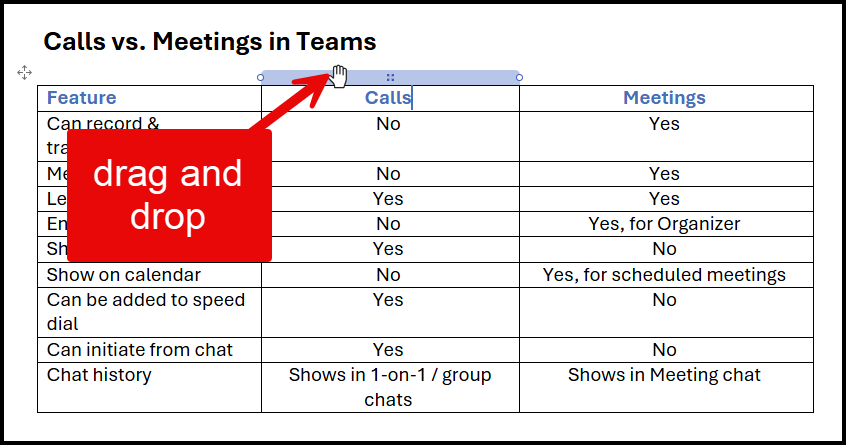
For example, if you want to move the "Calls" column to the second position, click on the column header, drag it, and drop it when the blue line appears in the desired position. You can also drag columns to the far right or left.
YouTube Video - NEW FEATURE - Word for the Web: Edit tables with ease
Rearranging Rows
Along with column reordering, you can also rearrange rows within your table. This is particularly useful for organizing data efficiently.
To move a row, hover over the row until you see a blue icon. Click and drag the row to its new position. The blue line will show you where the row will be placed.
For instance, you can move a row between "Meeting Info" and "Leave". Click on the row, drag it, and drop it when the blue line appears in the desired position. This makes it simple to keep your table organized.
Inserting New Rows
Adding new rows to your table is now more straightforward than ever. This feature allows for quick data entry without disrupting the existing table structure.
To insert a new row, hover between two existing rows until you see a plus sign. Click on the plus sign, and a new blank row will be added in that position.
This feature is excellent for expanding your table as needed without having to manually adjust each row. It ensures that your data remains organized and easy to read.
Conclusion
The new features for editing tables in Microsoft Word for the web make it easier to manage and organize your data. With the ability to reorder columns, rearrange rows, and insert new rows, you can customize your tables to suit your needs quickly.
These enhancements are available to all Word on the Web users starting September 2024. Be sure to take advantage of these features to improve your productivity and streamline your workflow.
Thank you for reading! Feel free to explore my other online training courses, including Copilot, Excel, OneNote, and Teams.
> Hope you enjoyed this tutorial and found it useful. Don't forget to subscribe to my YouTube channel for more tips and tricks!