Excel Copilot Formula Completion Now Available on Desktop

Share
Excel Copilot Formula Completion Now Available on Desktop

Excel's Copilot-powered Formula Completion is now available on the desktop app — not just Excel for the Web. Type an equals sign, and Excel suggests complete formulas based on your data context. Here are three examples showing how it works.

Extracting First Names

With a "Rep Name" column containing full names like "Chris Menard," type = in a "First Name" column. Formula Completion suggests =LEFT(C2,SEARCH(" ",C2)-1) — a formula that finds the space and extracts everything before it. Press Tab to accept.
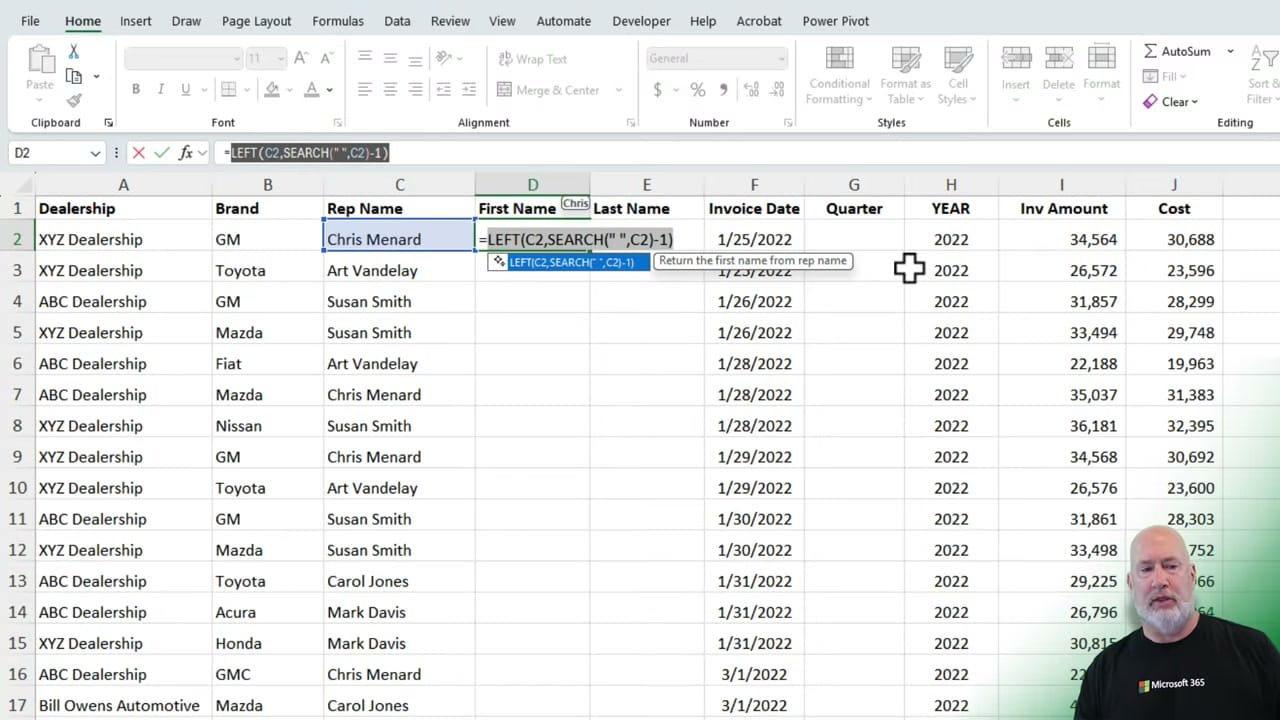
Excel showing Formula Completion suggesting =LEFT(C2,SEARCH(' ',C2)-1) in the First Name column, with a tooltip reading 'Return the first name from rep name'
Formula Completion suggests the exact LEFT+SEARCH formula to extract first names — just press Tab to accept.

Extracting Last Names

For the "Last Name" column, Formula Completion suggests a RIGHT+LEN+SEARCH combination that extracts everything after the space. The same pattern: type =, review the suggestion, and press Tab.

Calculating Quarters from Dates

Given an "Invoice Date" column, Formula Completion suggests =ROUNDUP(MONTH(F2)/3,0) to calculate the quarter — dividing the month by 3 and rounding up. This correctly maps January–March to Q1, April–June to Q2, and so on.
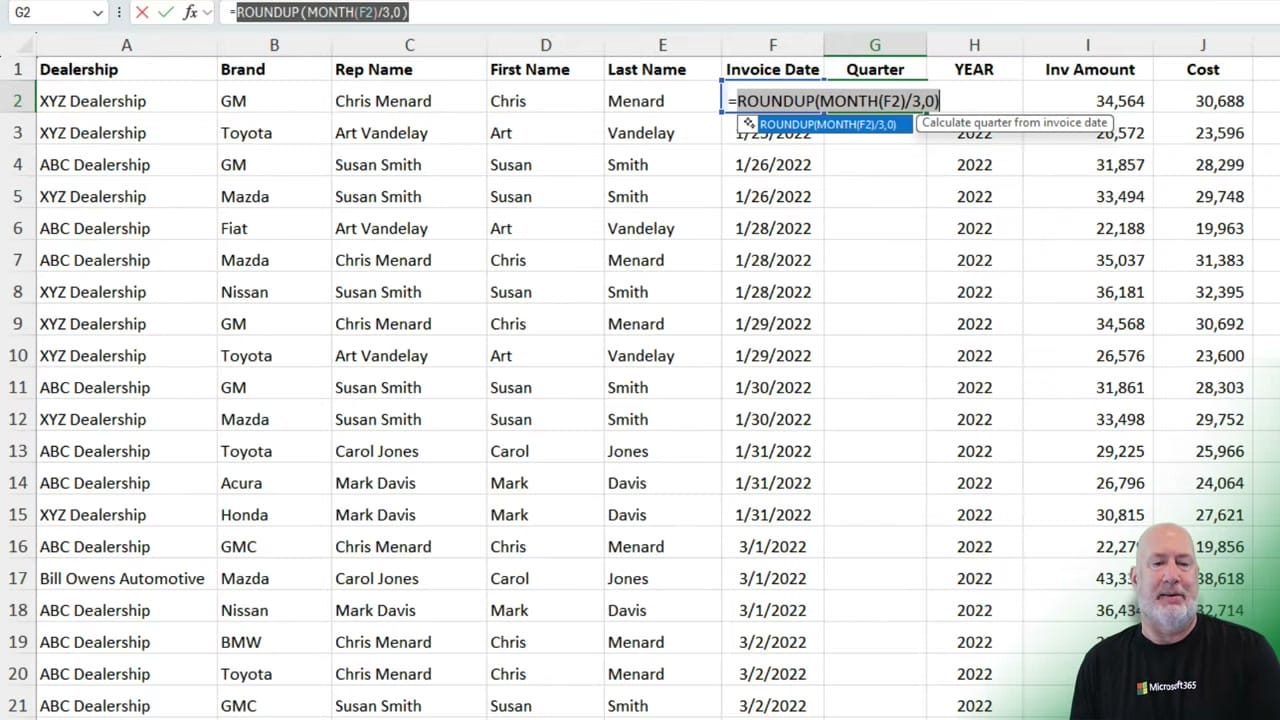
Excel showing Formula Completion suggesting =ROUNDUP(MONTH(F2)/3,0) in the Quarter column, with a tooltip reading 'Calculate quarter from invoice date'
Formula Completion identifies the date pattern and suggests ROUNDUP+MONTH to calculate fiscal quarters.

Key Details

  • Formula Completion now works on Excel Desktop, not just Excel for the Web
  • It requires a Microsoft 365 Copilot license
  • Suggestions appear automatically when you type = in a cell adjacent to existing data
  • Press Tab to accept a suggestion, or keep typing to ignore it
Excel FORMULA Completion vs COPILOT(): When to Use Each Feature
I use both Formula Completion and the Copilot function in Excel every week. They require a paid Microsoft 365 Copilot license. They solve different problems, and when you combine them, you can move fr
Financial Ratios - Formula Completion in Excel using Copilot
Writing formulas in Excel can be time-consuming and challenging, even for experienced users. Selecting the right function, referencing the correct cells, and ensuring proper syntax often slows down wo
Excel Formula Completion - Using XLOOKUP
Excel’s new Formula Completion feature makes writing formulas effortless. Just type the = sign, and Copilot suggests accurate, context-aware formulas.
Copilot In Excel: NEW Feature Enables Copilot Use Without a Table
Copilot in Excel has introduced some exciting new features that are designed to enhance your productivity. Copilot in Excel handles sorting, conditional formatting, pivottables, and asking questions.

Want to learn more? Visit courses.chrismenardtraining.com for online training courses.

Read more

Copilot Skills in PowerPoint - Live Stream on October 20, 2026

Copilot Skills in PowerPoint - Live Stream on October 20, 2026

𝗠𝗼𝘀𝘁 𝗣𝗼𝘄𝗲𝗿𝗣𝗼𝗶𝗻𝘁 𝘂𝘀𝗲𝗿𝘀 𝗸𝗻𝗼𝘄 𝗖𝗼𝗽𝗶𝗹𝗼𝘁 𝗰𝗮𝗻 𝗰𝗿𝗲𝗮𝘁𝗲 𝘀𝗹𝗶𝗱𝗲𝘀. 𝗙𝗮𝗿 𝗳𝗲𝘄𝗲𝗿 𝗸𝗻𝗼𝘄 𝗮𝗯𝗼𝘂𝘁 𝘁𝗵𝗲 𝟴 𝗯𝘂𝗶𝗹𝘁-𝗶𝗻 𝗖𝗼𝗽𝗶𝗹𝗼𝘁 𝗦𝗸𝗶𝗹𝗹𝘀 𝘁𝗵𝗮𝘁 𝗰𝗮𝗻 𝗰𝗼𝗺𝗽𝗹𝗲𝘁𝗲𝗹𝘆 𝗰𝗵𝗮𝗻𝗴𝗲 𝗵𝗼𝘄 𝘆𝗼𝘂 𝗯𝘂𝗶𝗹𝗱, 𝗶𝗺𝗽𝗿𝗼𝘃𝗲, 𝗮𝗻𝗱 𝗽𝗿𝗲𝘀𝗲𝗻𝘁 𝗮 𝗱𝗲𝗰𝗸. Join me live on October 20, 2026, at Noon Eastern as I demonstrate each Copilot Skill and show practical ways to use them in your presentations. PDF of the 8 Copilot Skills in Pow

By Chris Menard