
Copilot in Word: Quickly Add Numbers with Ease


As a Microsoft Word user, have you ever found yourself faced with a list of numbers that need to be added up quickly? Perhaps you've resorted to manually calculating them or exporting the data to Excel for a simple sum. Well, I'm excited to share with you a game-changing feature that will revolutionize how you handle numerical data in Word: Copilot.
In this blog post, we'll explore how Copilot in Word can effortlessly add up numbers, saving you time and reducing the risk of calculation errors. Let's dive in and see just how powerful this tool can be!
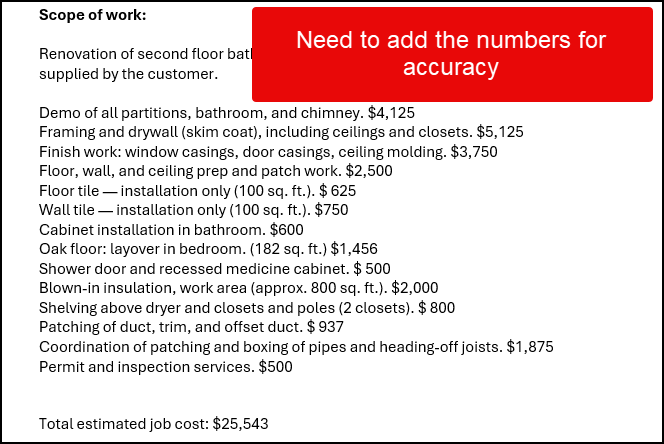
To demonstrate Copilot's capabilities in Word, I've prepared a document with a list of numbers, each in its own paragraph. This setup mimics a common scenario you might encounter when working with financial data, project estimates, or any other numerical information in Word.
Our test document begins with a paragraph titled "Demo of all partitions" and concludes with "Permit and Inspect Services." Between these bookends are various numerical values that we will add up.
For this demonstration, I've intentionally included a known total: $25,543. This will serve as our benchmark to verify Copilot's accuracy.
Executing the Calculation with Copilot
Now, let's put Copilot to the test and see how it handles our number-crunching task:
1. First, highlight all the paragraphs containing the numbers you want to add. 2. Look for the Copilot button in your Word interface and click on it.
That's it! With just these two simple steps, we've initiated Copilot's calculation process. No need to switch to Excel or pull out a calculator – Copilot is ready to do the heavy lifting for us right within Word.
YouTube Video
Copilot in Word: Quickly Add Numbers with Ease - YouTube
Results and Impressions
After clicking on Copilot, I was pleasantly surprised by the depth of information it provided. Here's what Copilot returned:
**"The total of the numbers listed is twenty-five thousand five forty-three, which matches the total estimated job mentioned in the text."**
Let's break down what makes this result so impressive:
- **Accuracy**: Copilot correctly calculated the total, matching our expected result of $25,543. - **Context Awareness**: It not only provided the sum but also recognized that this figure corresponded to the "total estimated job" mentioned in the document.



