I Asked Microsoft Copilot to Calculate My Taxes — Here's What Happened


Can Microsoft Copilot accurately calculate your federal taxes? I put it to the test by first walking through a manual tax calculation in Excel using the 2025 federal tax brackets, then asking Copilot the same question to compare results.
Part 1: Manual Tax Calculation in Excel
The process starts with understanding three key pieces of information:
- Filing status — Married filing jointly, single, head of household, etc.
- Taxable income — Found on IRS Form 1040, Line 15
- Tax bracket — The 2025 federal brackets determine how much you owe at each income level
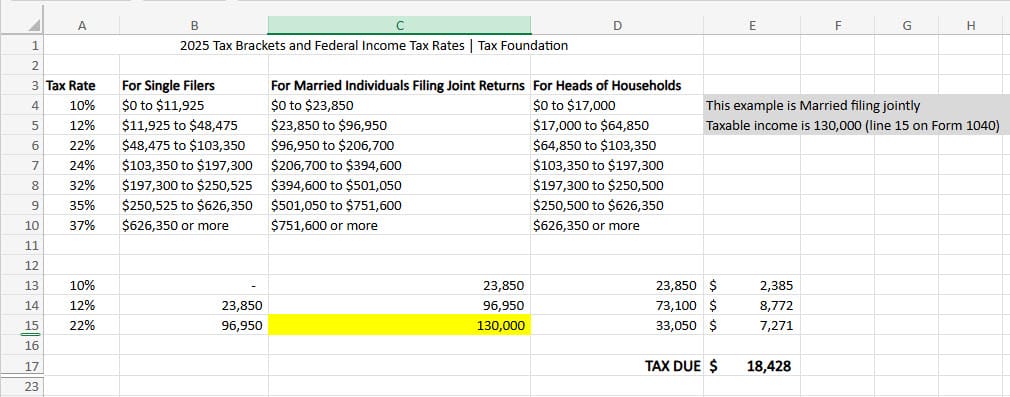
I demonstrate the step-by-step calculation in Excel, showing how the progressive tax system works. Each portion of income is taxed at a different rate — you don't pay the highest bracket rate on your entire income.
Part 2: Testing Microsoft Copilot
With the manual calculation done, Chris asks Copilot the same tax question. Copilot correctly identifies that it needs the filing status before it can calculate, and asks for clarification — a good sign that it understands the problem.
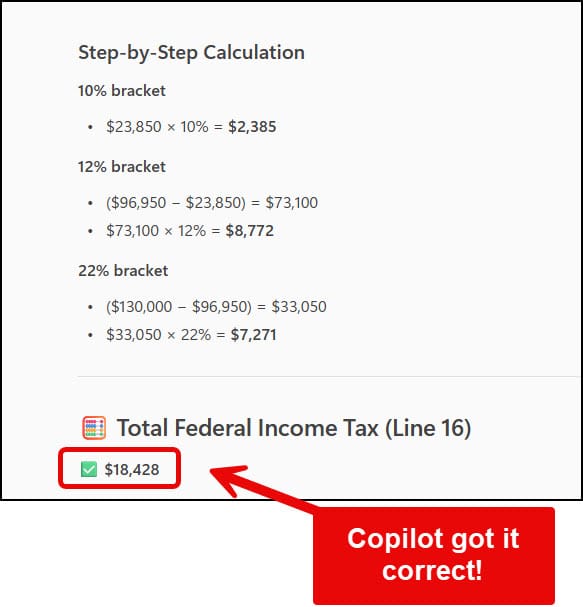
After providing the filing status, Copilot returns the correct tax liability, matching the manual Excel calculation.
Marginal vs. Effective Tax Rate
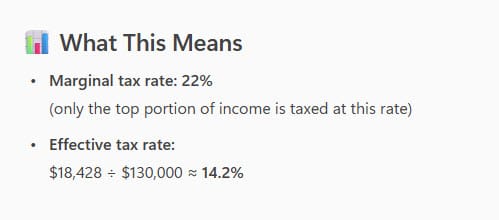
The video also covers the important distinction between the marginal tax rate (the bracket your top dollar falls into) and the effective tax rate (the actual percentage of your total income that goes to taxes). These two numbers can be very different.
For more Copilot-powered financial analysis in Excel, see how Copilot handles financial ratio calculations using Formula Completion, or how to use the Future Value function correctly for investment projections.
 Chris Menard
 Chris Menard
 Chris Menard
Want to learn more? Visit courses.chrismenardtraining.com for online training courses.