Excel - Advanced Filters


Excel filters are great for seeing just a subset of your data. You can use filters for text, numbers, and dates, but also by color. You can use font color or fill color (the paint can). You can also use Advanced Filters. You Advanced Filters when you are looking at multiple fields but for different criteria. For example, I want to filter and only see people in Georgia and New York. That is easy to do and can be done with the drop-down filter. But, for Georgia, I want to see people who are Single, and for New York, I want to see Family. That requires an Advanced Filter.
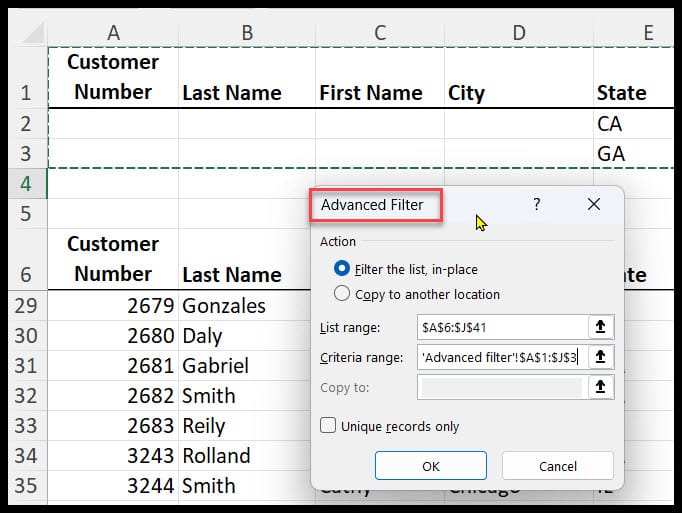
**Excel Advanced Filter**
Set up Advanced Filter
1. Insert blank rows 2. Copy and paste the header row 3. Type in your criteria 4. Click Data tab, then Advanced in the Sort and Filter group 5. Add your criteria range. Your list range should be your data. Both lists and criteria include their respective header rows.
YouTube Video
Excel - Advanced Filters - YouTube
Just some of the topics covered
1. Navigation Teams 2. Using private Chat 3. Using group Chat 4. Teams Meetings 1. Scheduling Meetings 2. Meeting controls 3. Roles in a meeting 4. Sharing resources 5. PowerPoint in a meeting 6. Scheduling Team meetings from Outlook 5. Working with Teams and Channels 1. Conversations 2. Files 3. Wiki and OneNote 6. Using Outlook and Teams 7. Using apps in Teams